

No. Apploye does not offer GPS or location tracking. It focuses on time tracking, screenshots, app and URL usage, and attendance, which covers most hybrid software and marketing team needs but won’t suit field-based roles that require geofencing.
How My Software Development Company Uses Apploye to Monitor Our Hybrid Team
POST BY
PUBLISHED
July 17, 2026
We’re a small software development company, nine engineers building the product, plus a three-person marketing team running SEO content, ads, and demand gen. Some of the employees works from a shared office; the rest are fully remote.
This is a walkthrough of the actual Apploye features our engineering and marketing teams use day to day, not a marketing overview of what the product could theoretically do. Some features we lean on heavily, some we’ve barely touched, and one thing it doesn’t do at all. If you’re a similar-sized hybrid team evaluating remote employee monitoring software, this is the unfiltered version.
Key Takeaways
- We run Apploye’s Elite plan across our 9-person engineering team and 3-person marketing team — $4.50/user/month billed annually, roughly $54/month total.
- Project-tagged time tracking and screenshot monitoring, applied consistently across the whole team, are the two features we rely on most.
- Timesheet approval and payroll-by-hourly-rate replaced a spreadsheet-and-honor-system setup for paying our contractors and freelancers.
- Apploye does not do GPS or location tracking — not a gap for us, but worth knowing upfront.
Table of Contents:
The Apploye Features Our Team Actually Uses
Apploye is a remote employee monitoring tool that tracks active/idle time, screenshots, app and URL usage, and attendance, with paid plans starting at $4.50/user/month billed annually. What surprised me is how unevenly we use the feature set. Engineering and marketing lean on almost entirely different parts of the same subscription, which says more about how the two teams actually work than about the product itself.
Time Tracking, Tagged by Project
Apploye supports automatic time tracking from desktop and mobile apps with a start/stop timer, plus manual time entry for anyone who forgets to hit start. Our nine engineers clock time against specific projects and tasks rather than a single generic “working” timer. That single change fixed our biggest reporting gap: knowing how much engineering time actually went to a given project versus internal tooling or bug fixes.
What Happens When Someone Forgets to Track Time
It happens most weeks to someone: a meeting runs long, or someone just forgets to hit start. Apploye handles this with manual time entry — from Timesheets > Daily, click “+ Add Manual Time” and log the hours after the fact. Manual entries show up in purple in the daily timesheet, so it’s immediately obvious which hours were tracked live and which were typed in later — no digging through logs to spot the difference.
We turned on the “Require Approval for Manual Time” setting, so a manual entry sits pending until someone signs off, and only approved manual time counts toward timesheets and payroll. One occasional manual entry a week barely gets a second look. The same person doing it every single day is a different conversation — not because we assume bad faith, but because it usually means the timer habit needs fixing, not the approval process. Apploye also won’t let you backfill time that overlaps an existing entry or log hours for a future date, which closes off the two ways this could otherwise get abused.
Screenshot Monitoring, Applied Across the Whole Team
As remote workforce management software, Apploye captures screenshots at a random interval within every 10 minutes, along with the apps and websites active during tracked hours. We turned this on for everyone clocked into a tracked project — salaried engineers and marketers included, not just our contractors and freelancers. That was a deliberate choice after some pushback in a team retro; scoping screenshots to contractor hours only would have felt like singling out the people already working under the most scrutiny, so we applied the same rule internally too. Marketing follows the same approach across both their internal content work and freelance campaign work.
Attendance and Leave Tracking
Apploye’s attendance feature offers automatic clock-in/clock-out for desk, hybrid, or remote staff along with leave request management. This is the feature our office-day employees interact with most and our fully remote engineers barely touch — attendance matters when half the team is walking into a shared office, less so when someone’s already logging hours against a project timer from home.
Timesheets, Approval, and Exports
Timesheets roll up automatically from tracked time into daily, weekly, biweekly, monthly, or custom-range views, and export as PDF, CSV, or Excel. This is genuinely the feature our HR cares about most — he needs signed-off hours before contractor payroll runs each month, and the approval step catches the small stuff: someone forgetting to switch their timer between two projects, which used to just get estimated at payout time.
Payroll for Contractors and Freelancers
Several people on our team work as independent contractors and freelancers rather than salaried staff, and Apploye calculates their payroll directly from tracked time — hourly-rate for contractors billing by the hour, one-time-rate for fixed-scope freelance work, with billable hours kept separate from internal, non-billable time. This is the feature that actually justified the subscription for us — before Apploye, paying contractors meant someone manually cross-referencing a spreadsheet against Slack messages and hoping nothing got missed. Now each contractor’s payout is built from the same hours they can see logged themselves.
Bringing a Contractor On (and Off)
Adding a new contractor starts on Apploye’s Members page: click “+ Invite Member,” enter their email, and choose which project or projects they’ll be assigned to before sending the invite. They accept from their inbox, and from that point on they can’t log time against anything they haven’t been explicitly assigned to — which turned out to be a useful guardrail on its own, since it forces us to scope a contractor’s access before they start rather than after.
Pay rate setup happens right after: in the member’s detail view, an admin adds a payment configuration and chooses hourly or monthly pay, and Apploye multiplies that rate by tracked hours automatically from then on. We set this before a contractor logs a single hour, not after their first invoice-equivalent payout — skipping that step once meant a week of tracked time with no rate attached, which turned into an awkward retroactive fix.
Offboarding is less documented on Apploye’s side, so this part is entirely our own process: when a contract ends, we unassign the person from their projects and pull them out of their team group, which stops new time tracking immediately while leaving their approved timesheet history intact as the record for their final payout. It also drops our seat count on the Elite plan right away, since we’re billed per active user.
Real-Time Dashboard and Activity Analytics
The real-time dashboard shows live team activity, and the activity analytics layer highlights productive versus idle time per project. In practice, this gets used almost exclusively by our engineering manager during sprint planning to see where hours actually went the previous week — not for spot-checking individuals mid-day, which was a boundary we set explicitly before rollout.
What Apploye Doesn’t Do: GPS Tracking
One gap worth being upfront about: Apploye doesn’t offer GPS or location tracking. That’s never come up as a problem for us since nobody on the team is a field employee, but if you’re managing delivery drivers or on-site technicians, it’s not the right tool for that specific need.
Engineering vs. Marketing: Who Uses What
Laid out side by side, the split is sharper than I expected going in. Engineering leans on time tracking, screenshots, and the real-time dashboard; marketing leans on timesheet approval and payroll/invoicing. Attendance is really the only feature both teams touch equally, and mostly because of our office-day schedule rather than anything Apploye-specific.
What Apploye Actually Costs Us Every Month
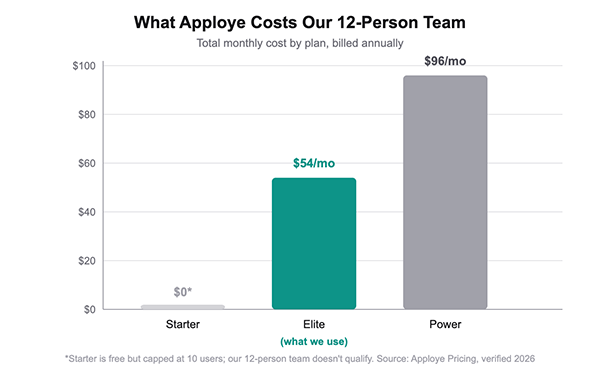
At our headcount — 9 engineers plus 3 marketing team members, 12 people total — we’re just over the free Starter plan’s 10-user cap, so we’re on the Elite plan at roughly $54/month combined, or about $648/year. The Power plan ($8/user/month annual) adds more advanced monitoring, but we haven’t needed it.
How the Team Reacted When We Rolled It Out
Nobody loved the first week. Two engineers asked directly whether this meant we didn’t trust them, and the honest answer was: it’s about accurate contractor payroll, not trust — which only actually landed once the first accurate contractor payout went out without anyone having to guess at hours. The marketing team adjusted faster, mostly because the timesheet-approval step solved a problem they’d already been complaining about.
What helped most was applying screenshot monitoring consistently across the whole team instead of singling out contractors, and being transparent about it in a team meeting before turning it on — not rolling it out silently and letting people discover it themselves.
How We Introduce Monitoring to a New Hire on Day One
The original rollout taught us not to let anyone find out about monitoring by noticing it. Every new hire and new contractor now gets a five-minute walkthrough before their first tracked hour, not after — what gets tracked, why screenshots run for everyone rather than just contractors, and that the whole point is accurate payroll and project reporting, not spot-checking individuals.
Part of that walkthrough is just showing them their own timesheet view — what they can see about their own tracked time is exactly what their manager sees, nothing hidden on either side. That single detail does more to settle nerves than any policy explanation does. New hires who get this context upfront skip the “does this mean you don’t trust me” conversation entirely.
Frequently Asked Questions
Does Apploye track GPS or location for hybrid teams?
Can you screenshot only certain projects instead of everything?
Yes — screenshot monitoring can be scoped per project rather than applied blanket-wide, but we chose not to limit it to contractor or freelance work only. Running it for salaried staff too, instead of singling out contractors, was the single biggest factor in getting our team comfortable with the rollout.
Does Apploye handle payroll, or just time tracking?
Both. Apploye calculates payroll from tracked time using hourly or one-time rates, separates billable from non-billable hours, and pays out contractors and freelancers from the same data — which is the combination that actually justified the subscription for our team.
Is Apploye affordable for a small hybrid team?
For a 12-person team like ours, the Elite plan runs about $54/month total at $4.50/user/month billed annually. Teams of 10 or fewer can use the free Starter plan indefinitely, which covers basic time tracking and timesheets before you need to pay anything.
Would We Recommend It to Another Hybrid Team?
For a software company our size running a mixed engineering-and-marketing headcount across billable and internal work, yes — the combination of project-tagged time tracking, scoped screenshots, and payroll in one subscription solved a real billing-accuracy problem for us. The rollout works better when you’re transparent about scope and purpose upfront rather than treating it as surveillance software you switch on quietly.



![Patch Management Software]](https://zingmatrix.com/wp-content/uploads/2026/09/Patch-Management-Software.webp)

