Ans: Adobe Photoshop is generally considered the best software by photography experts to edit images due to its extensive set of features and full-fledged color grading options.
The Best Photo Editing Software in 2026: Find the Perfect Fit for Your Needs
POST BY
PUBLISHED
September 9, 2025
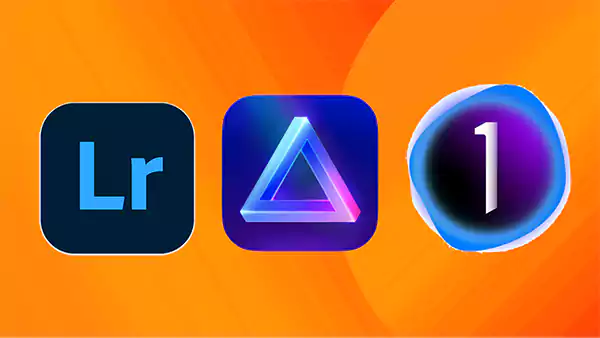
Whether you aim to become a photography expert, a graphic designer, or simply enhance your appearance on social media profiles. In such cases, graphic design software and photo editing software become an essential tool.
This software helps in assisting users to enhance, tweak, and personalize their images for personal or professional use. To choose the best image editing software, it is necessary to understand your requirements, as every software is equipped with a different range of features and price points to suit different needs.
After testing several photo editing software, we have curated a list of different free and paid software that offer distinguished features and specs to cater to the needs of both beginners and professionals.
Table of Contents:
What is Photo Editing Software, and How Does it Help to Enhance Your Images?
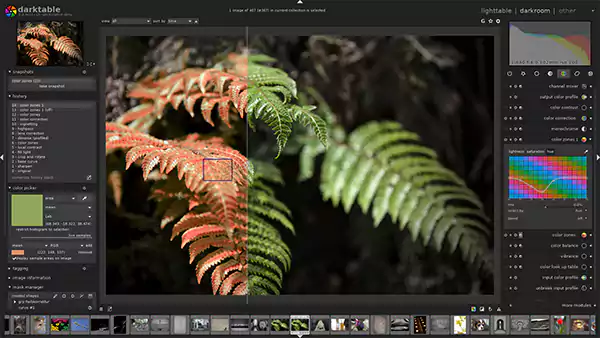
Photo editing software can be defined as a type of application or tool that helps in modifying and improving the appearance of digital images. It can help you adjust various aspects of an image, including size, color depth, exposure, and composition, according to your personal or professional requirements.
If you need assistance with quick edits, including applying effects and filters, or removing unwanted elements, or if you wish to perform advanced edits, this software can help you with both.
Users can also perform nondestructive editing with the use of image editing software, which provides them the opportunity to work on multiple layers and effects without making any change to the original image.
Also Read: SaaS SEO Agency: Scale Your SaaS Growth with Expert SEO Services
Top 5 Picks for Free Photo Editing Software
While most of the image editing software requires a subscription, there are certain free software programs available to cater to the needs of both professionals and beginners. We have curated a list of some of the best free image editing software below.
1. Canva
Canva is broadly considered one of the most popular free photo editing software programs due to its convenient interface and accessibility, regardless of experience level.
It presents a vast array of features with an easy-to-use interface, including versatile design tools, numerous styles & layouts, and thousands of free templates. Canva also offers a brand kit feature for businesses to design and manage up to 100 brands. These features help Canva become one of the best free photo editing software programs.
2. GIMP
The next on our list of free photography editing software is the GNU Image Manipulation Program, also known as GIMP, which is an open-source bitmap graphics editor that is free to use for everyone.
If you are looking for a strong alternative to Adobe Photoshop, which is free to use and can help you in your creative projects and even minor picture edits, GIMP might be the perfect fit for you.
It also offers noteworthy features, including layer-based editing, cross-platform support, and the ability to optimize the workflow by customizing the interface. Despite being free-to-use software, it offers compatibility with various operating systems, including GNU/Linux, macOS, Sun OpenSolaris, FreeBSD, and Windows.
3. Pixlr
Pixlr is a cloud-based set of SaaS creative tools, offering an easy-to-use platform for quick edits while also providing advanced tools for more complex tasks.
It is a versatile free image editing software that has AI-powered capabilities, collage templates, a timeline editor, and a library of design templates. While Pixlr E is an advanced photo editor tool, Pixlr X offers a user-friendly interface for quick photo improvements and fixes.
Pixlr provides a wide array of AI features, including AI Background Removal, AI Face Swap, AI Generative Fill, AI Remove Object, and AI Generative Expand.
4. Photopea
Photopea can be an option to consider, as it is a web-based photo and graphics editor, which means you don’t have to install any application on your device. It is a raster and vector graphics editor that has the potential to be a strong alternative to Adobe Photoshop.
While it closely resembles Adobe Photoshop and provides a similar kind of interface, Photopea offers amazing features as well. This is free image editing software, while users have an elective premium subscription option with additional features and resources.
5. Fotor
If you are searching for picture editing software free from subscription that is easy to use and offers incredible AI capabilities, Fotor might best suit your needs. It is an online photo editor and design tool that has a user-friendly interface with a wide range of editing tools, templates, and AI-powered features.
This is easy-to-use software that presents a vast library of filters and effects, with the option to unblur and restore old photos. Fotor is also equipped with a wide array of AI features, including AI image generation, AI effects, and AI scene recognition.
Also Read: Top 25 Revolutionary Project Management Software Tools That Actually Work
The 6 Best Image Editing Software for Professionals
Most of the internet users and photography enthusiasts are aware of Adobe Photoshop as the best photo editing software. While Photoshop offers a wide range of powerful features and tools, it is one of the costliest as well.
If you are considering Photoshop as expensive software and you are looking for a strong alternative to Adobe Photoshop, we have prepared a list of a few of the top picture editing software programs. These are generally used by graphic designers and creative professionals to cater to their editing requirements.
1. Adobe Photoshop
Adobe Photoshop is widely regarded as the most admired and best picture editing software, which is preferred by most creative professionals. The majority of businesses and working professionals use Photoshop to create digital illustrations and digital assets due to its industry standard as the best photo editing software.
It is the Adobe imaging software that has been the go-to choice of graphic designers, web designers, and digital artists due to its powerful features and its strong integration with other Adobe Creative Cloud applications.
| Duration | Pricing |
| Monthly | $31.49/month |
| Annually | $20.99/month |
| Creative Cloud | $22.99/month |
| Creative Cloud Pro | $69.99/month |
2. Luminar Neo
A Skylum-created application, Luminar Neo, has the potential to fulfill the artistic needs of both professionals and beginners. It is a convenient and responsive application to use, which offers several AI-powered tools and creative editing options.
Along with its core AI tools, it offers editing features, including layering, masking, facial recognition technology, denoising, and several color combinations. While Luminar Neo doesn’t have a free version, it offers a 7-day free trial and a 30-day money-back guarantee if it doesn’t suit your needs.
| Duration | Pricing |
| Annually | $99 |
| One-time subscription | $199 |
3. Capture One
Capture One is the software preferred by creative professionals for its robust features, a customizable workspace, and tethered or connected shooting capabilities.
It might not be one of the popular photo editing software, but Capture One has huge potential to fulfill your artistic needs. Advanced color grading, predefined instructions, masking and layering capabilities, and a vast collection of styles and presets make it a prominent choice for users.
| Duration | Pricing |
| Monthly | $25/month |
| Annually | $12/month |
4. DxO PhotoLab
DxO PhotoLab is a RAW image editing software program that is known for its advanced features, particularly its noise reduction, lens corrections, and exceptional RAW processing.
It also offers a vast array of features, including DeepPRIME noise reduction and powerful local adjustment tools. DxO PhotoLab provides some exclusive features, such as DxO Smart Lighting and DxO ClearView, but doesn’t offer any AI masking tools.
There is no subscription required to avail the services of DxO PhotoLab, as it offers a one-time purchase option. The cost to avail the one-time subscription is mentioned below.
| Duration | Pricing |
| DxO PhotoLab Essential | $139 |
| DxO PhotoLab Elite Edition | $229 |
5. Affinity Photo
Some professionals consider Affinity Photo as a strong alternative to Adobe Photoshop due to its affordability, complemented by a strong set of features.
You can perform non-destructive editing on this software, along with the use of a dedicated RAW persona, object selection, and blend modes. It supports HDR and EDR display for 32-bit unbounded HDR documents, and it is compatible with all common file formats, including PSD.
| Duration | Pricing |
| One-time subscription on macOS & Windows | $69.99 |
| One-time subscription on iPad | $18.49 |
6. Adobe Lightroom Classic
Adobe Lightroom Classic is a catalog-based and conventional version of Lightroom, which is a desktop-focused application specifically designed to cater to the needs of photography experts. While Lightroom is cloud-based software, its classic version only supports the desktop platform.
This software is best suited for professionals who want more detailed control, adaptive presets, and separate modes for organizing the library.
To edit on Lightroom Classic, you have to take the Adobe-provided Photography or Creative Cloud Photography plan. This plan also offers 20 GB of cloud storage and includes both Lightroom and Lightroom Classic.
| Duration | Pricing |
| Photography | $19.99/month |
| Creative Cloud Photography | $41.99/month |
Also Read: IaaS vs PaaS vs SaaS: Key Differences Explained with Examples
The 4 Best Picture Editing Software for Beginners in 2026
While image editing software is mainly used by experts to cater to their professional requirements, it can also be used by beginners to enhance pictures, improve color and composition, and also express creativity.
While the editing may seem a bit complex, certain software programs have an easy-to-use interface and provide tutorials that help beginners. We have listed some of them below.
Adobe Photoshop Elements
While Adobe Photoshop is designed to cater to the needs of graphic designers and photography experts, its Elements version can suit the needs of beginners due to accessibility.
Photoshop Elements doesn’t offer every feature of Photoshop, but it does provide sublime creative tools and effects, which are perfect for beginners to start their photography journey.
Adobe Photoshop Elements is a good photo editing software program that offers AI-powered features, guided edits, and competitive pricing, making it one of the best choices for beginners.
| Duration | Pricing |
| One-time subscription | $99.99 |
Polarr
Polarr is rated one of the best photography editing software programs for beginners due to its easy-to-use interface and convenient price point. Since it offers a wide array of features along with a tutorial guide and a free version as well, it is a prominent option to consider for beginners.
The pro version of Polarr offers advanced features, including premium filters, blending, stacking, and denoising.
| Duration | Pricing |
| Monthly | $7.99/month |
| Annually | $3.99/month |
Adobe Lightroom
Adobe Lightroom must be one of the most popular and widely used software programs used by beginners and experts. It’s a cloud-based service that is available on both desktop and mobile, allowing users to perform edits at their convenience.
It is generally considered the best photo editing software due to its industry standard as the preferred choice of creative professionals. The core features that Lightroom offers include creative assistance, comprehensive AI features, real-time editing capabilities, and seamless integration with Photoshop.
Adobe provides an option to subscribe to Lightroom individually or as part of the Photography or Creative Cloud Photography plan.
| Duration | Pricing |
| Annually | $11.99/month |
| Photography | $19.99/month |
| Creative Cloud Photography | $41.99/month |
Darktable
Darktable is a free and open-source photography workflow application and RAW image editor designed for users who want RAW image support, tethered shooting, masking tools, color management, and a wide array of image processing modules.
It is powerful software that offers support for selective masking, filmic RGB, workflow flexibility, artistic effects, and a customizable interface.
Darktable software suits the needs of beginners due to its user-friendly composition, zero latency, advanced color management, and no subscription requirement.
Also Read: Top 25 Revolutionary Project Management Software Tools That Actually Work
The Final Verdict
If you are a beginner or new to the photography world and searching for the best photo editing software, Adobe Photoshop & Adobe Lightroom might be the perfect fit.
It is widely used by the majority of graphic designers and digital artists, but it is a bit expensive as well. There are certain strong alternatives to Photoshop, including Luminar Neo, Capture One, and Affinity Photo, which can serve your purpose of image enhancement.
Frequently Asked Questions
Q1: Which is considered the best software for photo editing?
Q2: What software do most photographers use to edit photos?
Ans: Adobe Photoshop and Adobe Lightroom are the usual choices of photographers, graphic designers, and creative professionals to edit images.
Q3: Which photo editing program is best suited for a beginner?
Ans: Adobe Photoshop Elements, Polarr, and Adobe Lightroom are some of the best photo editing programs to consider that can fulfill the needs of beginners.
Q4: Which is better software: Lightroom or Photoshop?
Ans: While Lightroom offers several impressive features to its users, it can not be termed as better than Adobe Photoshop, as Photoshop is the most advanced and robust photo editing software available on the internet.
Q5: What are some of the best Photoshop alternatives?
Ans: Luminar Neo, Capture One, and Affinity Photo are some of the best alternatives to Adobe Photoshop that offer similar kinds of features at an accessible price point.