Companies use MDM software to safeguard company devices from one console. For security reasons, IT people push apps, set passwords, enroll phones, and lock lost devices remotely to secure clients’ data.
MDM Software for Businesses: Benefits, Types, and 5 Top Providers
POST BY
PUBLISHED
July 3, 2026
MDM software is a toolkit that helps the IT team to monitor, protect, and manage every laptop, desktop, and phone from one profile. With perfect mobile device management software, IT teams can ease data access, add rules, and control applications easily.
Know how MDM solutions protect devices from data breaches, the best providers, and pro tips to choose the right one that meets your requirements.
Quick Answer
MDM software is a tool that can access, manage, and protect company devices from a single platform. IT teams in the company use these tools to install official apps, set passwords, and enroll devices to prevent data breaches. It secures professional data on company-provided or employee-owned laptops, desktops, and phones.
Table of Contents:
- What Is MDM Software?
- Why Does Your Business Need MDM Software?
- Key Features of Mobile Device Management Software
- How Does MDM Software Work?
- Difference Between Cloud-Based and On-Premise MDM
- Top 5 MDM Providers in 2026
- What Is the Difference Between MDM, EMM, and UEM?
- Who Uses MDM Software the Most?
- How to Choose the Right MDM Solution
- Dos and Don'ts of Using MDM Software
- Conclusion
- FAQs
What Is MDM Software?
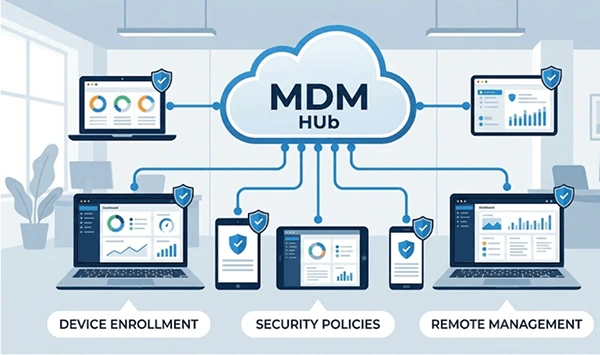
MDM software is a toolkit that supports IT teams in securing and managing mobile devices from one system. The full form of MDM is mobile device management. It handles tablets, phones, and even laptops throughout the company. These MDM tools impose security rules to protect against data breaches on all screens employees use.
Almost all MDM platforms install a small profile on every device. This profile helps admins access push settings over the air. According to the US National Institute of Standards and Technology, MDM plays an important role in device security in any organization.
Why Does Your Business Need MDM Software?
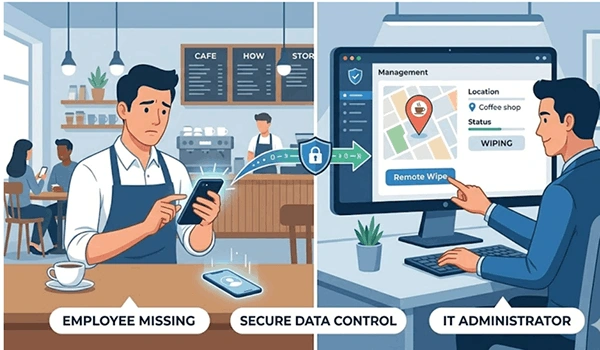
Your business needs MDM software to secure clients’ data when your employees work. Some risky apps, weak passwords, and lost mobile phones create a dangerous situation. Therefore, a perfect device management system fills these gaps for data threats and sets your IT at ease.
Here are the most important reasons why businesses need such tools:
Security: Lock or wipe a lost device in seconds to protect data.
Control: Set passcode rules and block unsafe apps across all devices.
Speed: Set up a new device in minutes, not hours.
Compliance: Meet rules like HIPAA or GDPR with clear records.
BYOD support: Keep work data separate on personal devices.
Suppose an employee forgets his company-provided phone somewhere. The phone has important files and open emails. With MDM solutions, the IT team can lock it and wipe the data immediately. This single feature prevents data breaches.
Working remotely makes it necessary to use MDM. Employees work in cafes, restaurants, or airports, or from home. Every new location creates a risk to clients’ data. Therefore, MDM software gives the IT team access to devices regardless of location.
Key Features of Mobile Device Management Software
Perfect mobile device management software has a common core of main features. These tools primarily focus on privacy and policy control, enrollment, and remote actions. Here is a table that shows what you can expect from MDM software solutions today.
| Feature | What It Does |
| Device Enrollment | Includes new devices in the profile |
| Remote Wipe | Erase data from a stolen or lost device |
| Location Tracking | Help to find a missing company asset |
| App Management | Update and install work applications |
| Policy Enforcement | Adds new passwords and security guidelines |
| Compliance Reports | Track compliant devices as per the rules |
Some remote device management software tools give companies alerts for possible threats and updates for patches. These extra features keep you posted about phishing attacks and malware activity on devices.
These two features add an extra security layer. The first one is containerization, which bifurcates a phone into two parts: one is professional, and the other is personal. The server can access only the professional part. The second one is automatic enrollment. A new device automatically sets up when it turns on. Both features decrease the errors and save time. These MDM applications are treated as standard.
How Does MDM Software Work?
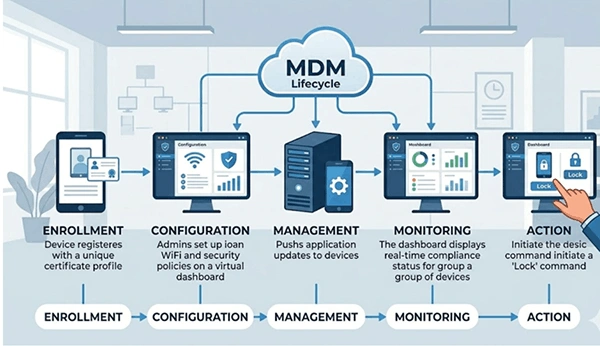
The MDM software links all the devices to a central server with a small client profile. The server sends commands and rules to devices, and they, in return, report back to the server. This process keeps every mobile device management system secure and in sync.
Go through this basic process with simple steps:
Enroll: The device gets registered on the MDM platform with a unique profile.
Configure: Admins create passwords for WiFi and application rules.
Manage: IT access apps and update them on time using server commands.
Monitor: The system keeps checking each device against possible risks.
Act: Admins have access to lock, track, and erase if required.
Whether Google, Microsoft, or Apple, all build official enrollment programs. All Microsoft Intune, Android Enterprise, and Apple Business Manager use this same profile-based model.
Difference Between Cloud-Based and On-Premise MDM
Let’s know the difference between cloud-based and on-premise MDM software and which one is perfect for you in the comparison table below.
| Feature | Cloud MDM | On-Premise MDM |
| Deployment | Vendor manages in the cloud | Installed and accessed on the company’s server |
| Best For | Small and medium-level companies | Large companies with compliance requirements |
| Software Updates | Updates and patches are automatically | Updates and patches are applied manually |
| Security Control | Responsibilities shared with the vendor | Full control over data and policies for security |
| Setup Time | Can be deployed quickly | Take a lot of time to deploy for server setup |
| Initial Cost | Lower | Higher |
| Maintenance | Vendor handles | The company’s IT team handle |
| Scalability | Scales easily, just as devices increase | Need extra hardware to scale the number of devices |
| Accessibility | Can be accessed from anywhere with the Internet | Limited to the corporate network or using VPN |
| IT Team Requirement | Needs minimal IT involvement | Needs a specific IT team |
Top 5 MDM Providers in 2026
The best MDM providers offer easy installations, strong security, and reliable and quick support. The list below includes some top MDM solutions used by businesses of all sizes. Make sure to check each vendor’s official page for the latest features and current pricing.
1. JumpCloud
Jumpcloud is mainly Apple-centric MDM software, which is built for iPad, iPhone, Apple TV, and macOS devices. It allows IT teams to manage compliance, deploy software, automate device setup, and secure policies. This platform is very famous among companies with more Apple devices.
Key Features
- Automated enrollment for Apple devices
- compliance management
- Application installations
- Reporting and monitoring of devices
- Endpoint Detection and Response (EDR)
| Pros | Cons |
| Perfect for Apple devices | Limited to Android & Windows users |
| User-friendly interface | Costlier for small businesses |
| Excellent features for automation | Apple-focused focus may limit other users |
| Quicker device deployment | Only a few integrations from third-party |
Pricing
The starting price is approximately $3.20 to $9 per device monthly, depending on the number and type of devices, or a monthly or annual subscription.
2. Google Endpoint Management
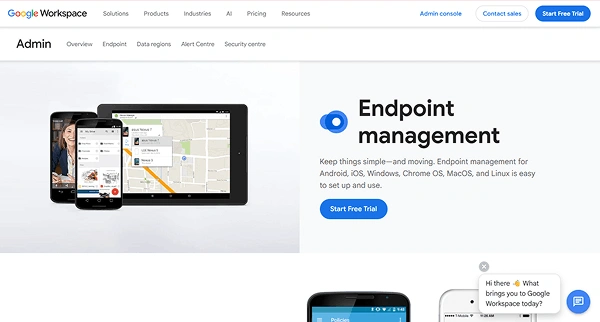
Google Endpoint Management MDM is a part of Google Workspace. It lets companies control ChromeOS devices, Android, iOS, and Windows devices. With this software, IT teams protect company data, secure policies, and manage applications.
Key Features
- Smooth device enrollment
- Password protection
- Erasing device data remotely
- Chrome operating
- Google Workspace integration
| Pros | Cons |
| Covers Google Workspace plans | Limited MDM capabilities for advancement |
| Quick and easy process | Only a few tools for automation |
| Google Chrome operating system support | Limited features for reporting |
| affordable pricing as per requirements | Less suitable for large companies |
Pricing
The base price starts at $7 to $8.40 per user per month, with 20 GB of pooled storage, an email ID, and video meetings for up to 100 users.
3. Omnissa
Omnissa offers the services of Workspace ONE after VMware transitions its end-user computing business and provides single endpoint management for not only mobile devices and desktops but also other applications. It gives a seamless experience for iOS, Windows, Android, and macOS devices from a single platform.
Key Features
- Single endpoint management system
- Application management
- Identity and access management
- Analytics and reporting
- Remote support and compliance tracking available
| Pros | Cons |
| Multi-platforms support | Difficult process for deployment |
| Advanced security capabilities | Costs are higher to buy |
| Perfect for large companies | Requires training for administrators |
| Excellent analytics | Can be overwhelming for small teams |
Pricing
The starting price for the base model is around $3 to $5.40 per user monthly, varying depending on multiple users, requirements, and subscription type.
4. Scalefusion
Scalefusion is one of the most unified endpoint MDM tools that allows companies to secure ChromeOS, macOS, iOS, Android, and Linux devices efficiently. Organisations like it due to its strong risk management capabilities, affordability, and easy and quick deployment.
Key Features
- Manages multi-platform devices
- Kiosk mode management
- Troubleshooting remotely
- Manage applications
- Geofencing and device tracking
| Pros | Cons |
| Affordability in pricing | No multi-enterprise features |
| Smooth deployment | Limited advanced analytics |
| Perfect kiosk mode support | Lack of multi-integrations |
| Works on a multi-platform system | Competitors have larger ecosystems |
Pricing
Pricing starts at approximately $2 to $6 monthly per device, but it varies according to devices, users, and monthly and yearly subscription types.
5. Microsoft Intune
It is a cloud-based endpoint solution that allows IT teams to control and manage devices and applications. This tool perfectly integrates with Windows environments, Azure, and Microsoft 365.
Key Features
- Manages and enrols multiple devices
- Reliable application management
- Covers device compliance
- Integrates Windows Autopilot and Microsoft Defender
| Pros | Cons |
| Covers Microsoft 365 in many plans | Complex interface for non-technical users |
| Handles several platforms | Difficult initial configuration |
| Better security and compliance tools | Advanced features need extra licenses |
| Perfect integration of the Microsoft ecosystem | Limited reporting options |
Pricing
The subscription to Intune Plan 1 starts at approximately $4 to $8 per user.
Note: Some reliable sources, such as The CTO Club, review the best MDM platforms every year. Go through these guides to know more about the trending MDM tools first, and test a trial version for the one that aligns with your requirements.
What Is the Difference Between MDM, EMM, and UEM?
Know the difference between MDM, EMM, and UEM. The MDM handles device-related activities. EMM works for content and application control. UEM secures all endpoints, like laptops, desktops, and IoT, all in one tool.
| Term | Full Form | Main Focus |
| EMM | Enterprise Mobility Management | Devices, apps, and content |
| MDM | Mobile Device Management | Device-level control |
| UEM | Unified Endpoint Management | All endpoints in one place |
According to Venn, most MDM software solutions have now shifted into full UEM tools over time.
Who Uses MDM Software the Most?
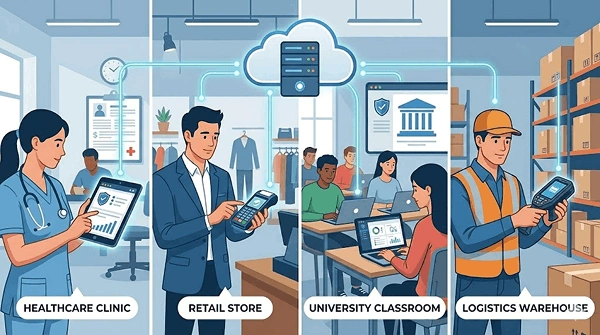
Most industries use MDM software nowadays, but some of them are more dependent than others. These industries work with sensitive data and large datasets. Strong device management tools are powerful enough to secure data from malware threats.
- Healthcare: Secures patient records and history with HIPAA rules.
- Retail: Handles daily sales, maintains current stock, and protects customers’ details across multiple stores.
- Education: Verifies shared study notes and blocks insecure websites.
- Finance: Protects banking apps from malware attempts and data breaches.
- Logistics: Keeps track of scanners that warehouse staff and drivers use.
Not only big companies but also small businesses need protection. A small shop with around 20 phones also needs a lost-device risk. The latest mobile management tools now have plans that fit every budget.
How to Choose the Right MDM Solution
Select the right MDM solution tool that perfectly aligns with your budget, security requirements, and devices. The perfect device management software must be user-friendly and have faster deployment. Always remember to ask these questions before finalizing them.
- Work types: The tool must work smoothly with Windows, Android, or iOS devices.
- Handling devices: Finalize the tool that works for your team members.
- Budget per device: Always compare the price for each device with the providers.
- Support a BYOD policy or not: Make sure to clarify if it separates personal and professional data.
- Support quality: Read reviews for response times and help with the setup process.
Real Advice: Most teams buy the premium version. Always buy core features according to your current business requirements and be able to upgrade later. A free trial is better than a sales call.
Dos and Don’ts of Using MDM Software
Here are some effective rules for using the MDM tools more efficiently. Today’s small habits lead to the prevention of big problems in the future.
Dos
- Always test your MDM software on multiple devices first.
- Have stronger passcode and encryption rules for all employees.
- Make a clear BYOD (bring your own device) policy and share it with all teams.
- Keep updating device patches and software promptly
- Guide your employees so that they are aware of what the IT team can and can’t access.
Don’ts
- Don’t transfer personal data on a company-provided device.
- Never skip the terms and conditions that all must agree to while enrolling.
- Don’t ignore old devices that are no longer receiving updates.
- Never select a tool just for a lower price because 24/7 support is important.
Conclusion
The perfect MDM software protects the data of your company and keeps the IT team stress-free. It secures all devices by blocking threats and saving hours of manual tasks. No matter if employees have ten or a hundred mobile phones, strong mobile device management software handles everything effectively.
Next step: Select two or three service providers and test them with real devices. Finalize the one that is easy for the team to use.
FAQs
What is MDM software used for?
Is MDM software safe for personal phones?
Yes, MDM tools separate work and personal data on phones. IT teams can only access and manage the work data and can’t check your apps, photos, and messages.
What is the best MDM software?
The best MDM software varies according to your devices. Scalefusion is perfect for all small companies, and Microsoft Intune works well for Windows. Jumpcloud and Jamf are excellent for Apple teams.
How much does MDM software cost?
Almost all the MDM providers charge you a monthly fee per device. The price varies by team size and features. Therefore, it is better to check the official page of the vendors to know the best price.
What is the difference between MDM and UEM?
MDM (Mobile Device Management) regulates mobile devices only, while UEM (Unified Endpoint Management) operates all endpoints, IoT, and laptops from a single platform.
Sources: